How To Install CUDA 9.2 in Ubuntu
- Download CUDA 9.2
- Use this website
- 17.04 version still works
- Install latest NVIDIA graphics drivers
- Do NOT use the Nvidia website’s .run file. It will crash
- Run the command
to add the repositorysudo add-apt-repository ppa:graphics-drivers/ppa - Go into the software center → Software & Updates → Additional Drivers
- Select “Using NVIDIA driver metapackage from nvidia-driver-396” and apply changes
- 396 is the latest, short-term release driver. You have to use the latest short-term release driver instead of the latest long-term release driver for CUDA
- Eventually it will prompt you with a EULA and a secureboot password. Remember this password. It will only be used once, and there is a probably a long process if you accidentally type it in wrong
- Reboot your computer
- A blue screen will appear before the boot sequence. Hit Enroll → Continue, enter in the previously mentioned password, and reboot.
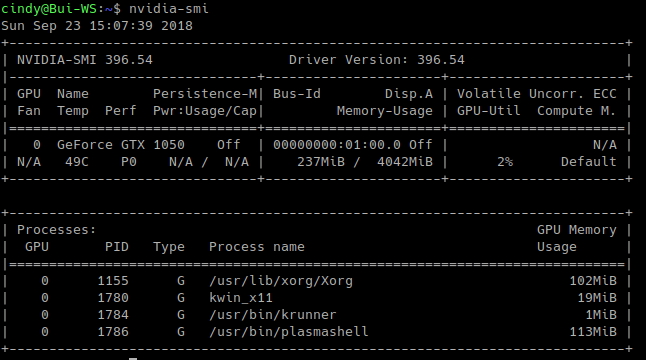
- Verify that the drivers work by running
. It should look like thisnvidia-smi -
- Install CUDA “dependencies” with
sudo apt-get install freeglut3 freeglut3-dev libxi-dev libxmu-dev - Install CUDA 9.2
- Navigate to where you installed the CUDA downloads
- Run the command
sudo sh cuda_9.2.148_396.37_linux.run - Read the EULA and other information
- Answer the questions this way:
You are attempting to install on an unsupported configuration. Do you wish to continue? (y)es/(n)o [ default is no ]: y *IMPORTANT* Install NVIDIA Accelerated Graphics Driver for Linux-x86_64 396.26? (y)es/(n)o/(q)uit: n Install the CUDA 9.2 Toolkit? (y)es/(n)o/(q)uit: y Enter Toolkit Location [ default is /usr/local/cuda-9.2 ]: Do you want to install a symbolic link at /usr/local/cuda? (y)es/(n)o/(q)uit: y Install the CUDA 9.2 Samples? (y)es/(n)o/(q)uit: y Enter CUDA Samples Location [ default is /home/cindy ]: (optional, keep it in ~) - Install the patch with
sudo sh cuda_9.2.148.1_linux.run - Setup the PATH and LD_LIBRARY_PATH environments with
export PATH=/usr/local/cuda-9.2/bin${PATH:+:${PATH}} export LD_LIBRARY_PATH=/usr/local/cuda-9.2/lib64${LD_LIBRARY_PATH:+:${LD_LIBRARY_PATH}}- NOTE: the above command only works for the current session. To make these commands run after a shutdown, edit ~/.bashrc and add the two lines to the bottom of that file
- Test CUDA by building the samples
cd ~ mkdir cuda-testing cp a NVIDIA_CUDA-9.2_Samples cuda-testing cd cuda-testing make -j4 - Run samples
and run any others you’d like!cd bin/x86_64/linux/release ./simplePrintf
Credit goes to Dr. Donald Kinghorn with this article